TL;DR
- I built two parallel content sites with identical posts: one on EmDash + Cloudflare Workers + D1 (emdashcms.pl), one on a hand-coded WordPress theme on Hetzner (emdash.pl). Both sites scaffolded with Claude Code.
- I ran 4,732 cold-isolated curl measurements over ~3.5 days (182 runs × 13 pages × 2 sites), plus follow-up runs after every optimization.
- WordPress was 6.4× faster on server processing (84 ms vs 543 ms mean). After I rewrote EmDash’s data fetching with
server:deferand a batch tag API, the gap narrowed to 4.1× — still 322 ms vs 78 ms. - The Cloudflare paid Workers plan ($5/mo) made things slightly worse, not better.
- Jacek Żmudziński, who reviews Search Console crawl stats for a living, looked at the download-time numbers blind. He filed ~1,300 ms in the “scrap and rebuild” tier. The same blind review put well-tuned WordPress in “decent” and Astro in “exemplary”.
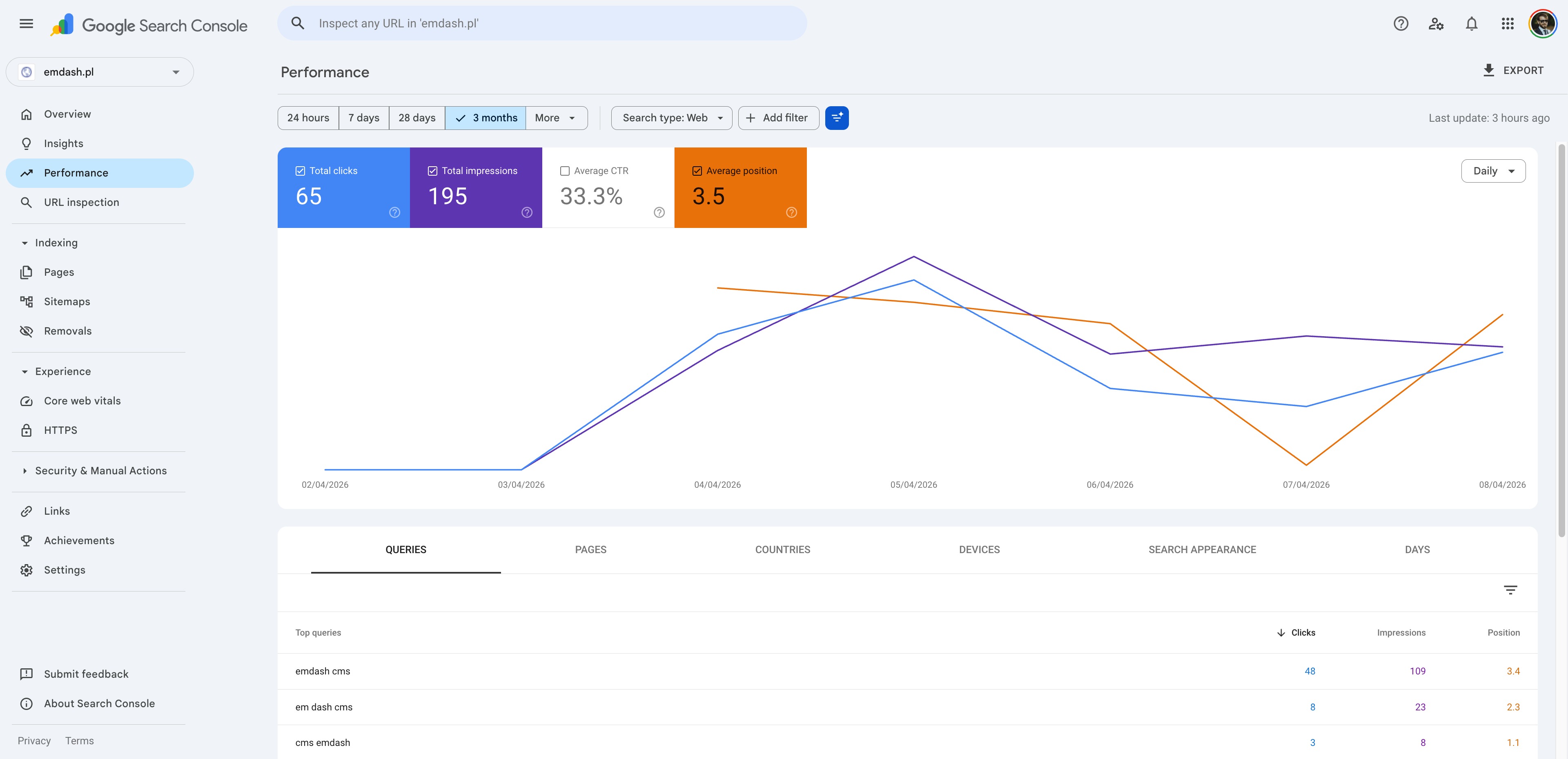
- After one week of indexing, the WordPress site has 4.3× more clicks, 3.9× higher CTR, and outranks the EmDash showcase site on the EmDash brand query itself (position 3.4 vs 13.7). And the WP site received zero updates the entire time.
- I wanted EmDash to win. I was so sure it would that I bought
emdashcms.plbefore the first measurement. This article exists because the data did not cooperate. - Both repos (EmDash site and the WP comparison theme) are public — linked at the bottom.
- In the meantime: come argue with me on X or on LinkedIn.
I read 150 EmDash takes in a week. Maybe 1 in 100 had installed it.
When EmDash launched, my feed turned into a wall-to-wall opinion war.
One side declared EmDash the final nail in WordPress’s coffin. The other side wrote it off as a toy that would never matter. And reading both camps for a week, I had the same dull feeling over and over: almost nobody had actually installed the thing. Maybe 1 post in 100 read like the author had genuinely touched the product. Not the loudest enthusiasts. Not the loudest skeptics. The other 99 were copy-pasting whichever side’s bullet points sounded better and going to bed. A handful had a measured, sober take. The vast majority were retransmitting marketing.
I was firmly in the enthusiast camp. Not “WordPress is dead” enthusiast — I run a WooCommerce performance practice, I know how stubbornly that ecosystem keeps shipping value — but enthusiast in the “this is exactly the missing piece for the small-business segment” sense.
So I did what enthusiasts do. I bought the domain — emdashcms.pl — before I had any measurements. I scaffolded the site in an evening with Claude Code. I was already drafting the migration playbook in my head.
Then I started actually using the site I’d just built.
I keep the Core Web Vitals Test Chrome extension pinned to my toolbar — the kind that sits there and quietly reports LCP, INP and CLS for whatever page I’m on, in real time. On most well-built sites I forget it exists. On a healthy page it does nothing. The icon turns red the moment a metric crosses the “poor” threshold.
Clicking through my own EmDash post pages, that little icon started blinking red. Not catastrophically. Not on every page. Just often enough that I couldn’t pretend I hadn’t seen it. The page I had built specifically to prove how fast EmDash was — was the page lighting up the warning lamp.
That was the moment. I closed the tab, opened a terminal, and started writing the benchmark this article is built on.
What I was hoping EmDash would unlock
This matters, because the disappointment only makes sense if you understand the expectation.
A huge slice of the SMB market sits on WordPress for one reason: a non-technical owner needs to edit the offer, the contact details, the team page, a service description, without filing a ticket. That’s it. They don’t need WooCommerce. They don’t need 47 plugins. They need a CMS.
What they get instead is the WordPress maintenance treadmill: plugin updates, security patches, the occasional surprise white screen, an annual “your site is slow” panic. Marketers and small-business owners I talk to are tired of it.
EmDash, on paper, is the answer to that complaint:
- Astro for the runtime — zero-JS by default, edge-deployable, the kind of speed I’d brag about.
- A real admin panel — so the client can edit content without touching code.
- Cloudflare Workers + D1 — serverless, no server to patch, no PHP version to worry about.
- Cloudflare’s blessing — they shipped migration tooling on day one, which sent a strong “this is going somewhere” signal.
If that combination delivered WordPress-grade ergonomics with Astro-grade performance, it would slot directly into the SHIFT64 worldview: own your stack, no reseller margins, no plugin treadmill, fast by construction. I was ready to recommend it.
That’s the bias I walked into the benchmark with. Keep it in mind as you read the numbers.
The setup
I wanted an apples-to-apples comparison, so I took deliberate care with the WordPress site. No Elementor, no page builder, no plugin soup. A hand-coded theme (also scaffolded with Claude Code) modeled on the same content structure as the EmDash site, with only Object Cache running. No full-page cache, no Cloudflare APO, no Varnish.
Why no full-page cache on WordPress? Because EmDash’s Worker still does work on every request — it queries D1, it composes HTML. To compare a cached HTML file against a Worker doing real work would be dishonest. I wanted both backends doing similar amounts of work per request, then measure how long that work actually takes.
| EmDash site | WordPress site | |
|---|---|---|
| Engine | Astro 6 + D1 (SQLite at edge) | PHP 8.4 + MySQL |
| Hosting | Cloudflare Workers (serverless) | Hetzner (Frankfurt) |
| CDN | Cloudflare (native) | Cloudflare (proxy) |
| URL | emdashcms.pl | emdash.pl |
| Caching | Official emdash-blog template defaults — see below | Object Cache only |
| Built with | Claude Code | Claude Code |
| Network path | OVH Warsaw → CF Edge → D1 | OVH Warsaw → CF Proxy → Hetzner Frankfurt (~400 km) |
What “EmDash defaults” actually means
The EmDash site runs the official emdash-blog starter template unmodified — exactly what a developer gets the first time they scaffold an EmDash project. That template wires up three things adjacent to caching, and it is worth being precise about each, because “default caching” is doing a lot of heavy lifting in most online discussions:
-
D1 with
session: "auto"— inastro.config.mjs, the database binding is declared asd1({ binding: "DB", session: "auto" }). This enables D1’s Sessions API, which is a read-replication / read-after-write consistency hint for D1 itself. It is not a page cache. Every query still goes over the wire. -
Per-page
cacheHintemission — every page that fetches content does it like this:const { entries: posts, cacheHint } = await getEmDashCollection("posts"); Astro.cache.set(cacheHint);Both
getEmDashCollection()andgetEmDashEntry()return acacheHintdescribing how the result depends on the underlying collection / entry. The template dutifully feeds it intoAstro.cache.set()onindex.astro,posts/index.astro,posts/[slug].astroandpages/[slug].astro. -
A bare Worker handler —
src/worker.tsis exactly three lines:import handler from "@astrojs/cloudflare/entrypoints/server"; export { PluginBridge } from "@emdash-cms/cloudflare/sandbox"; export default handler;No
caches.open(), nocaches.default, no Cache API wrapper, no middleware settingCache-Controlon HTML responses. The onlyCache-Controlheader anywhere in the template lives on the RSS feed (src/pages/rss.xml.ts→public, max-age=3600).
Now the catch. Astro.cache.set() only does anything if there is an experimental.cache provider configured in astro.config.mjs to actually consume the hints. The default emdash-blog template does not configure one — there is no experimental: { cache: ... } block. So in the unmodified template, the cacheHint mechanism is wired up at the call sites, but no consumer exists on the other end. The hints are emitted into a void.
The practical consequence: on the default emdash-blog template, every HTML request — human, curl, or Googlebot — runs the full data-fetching chain against D1 and renders the page fresh. That is the baseline these numbers measure. No HTML caching is in play. The Sessions API is doing what it does for D1 reads, the cache hints are being emitted but not stored, and the Worker is just rendering the page on every hit.
This is also exactly what we ran in the early days of the experiment, before any of the manual optimizations described later in this article. Everything starts from the unmodified starter.
Note one more thing in the table: WordPress has a longer network path. Every WP request hops through Cloudflare’s proxy and then crosses ~400 km to Frankfurt before any PHP runs. EmDash runs at the edge, in theory close to the test server. The geography favors EmDash. That’s important context for what comes next.
Methodology
| Parameter | Value |
|---|---|
| Test period | 2026-04-03 16:30 → 2026-04-07 06:28 UTC (~3.5 days) |
| Total measurements | 4,732 (2,366 per site) |
| Runs | 182 |
| Pages tested | 13 (homepage + 12 posts, identical content on both sites) |
| Tool | curl with full timing breakdown (--write-out) |
| Test server | OVH VPS, Warsaw |
| Isolation | New curl process per URL — no keep-alive, no client cache |
| Request order | Randomized per run (kills DNS-cache bias) |
The cron schedule varied across three phases to force cold starts — 10-minute baseline (Workers stay warm) → 58-minute gap → 3-hour gap bursts firing :00/:01/:02 to separate cold-start cost from steady-state cleanly. Full phase-by-phase methodology, raw results.csv, and analyze.py in the benchmark repo.
The verdict from someone who reads crawl stats for a living
Before I show you my own numbers, here’s the part that pushed me from “huh, that’s unexpected” to “OK, I have to write this up properly”.
I sent the Search Console crawl-stats charts — just the download-time graphs, no labels, no commentary — to Jacek Żmudziński, Head of GEO & SEO at Makolab. At his level he isn’t personally picking through every client site any more — he runs a team that does — but he spent years living inside Google Search Console before that, and the instinct for what a healthy crawl-stats download-time chart looks like is the kind of thing you don’t unlearn. He grades these in his sleep.
He came back with a four-tier read on what he saw, blind:
| Download time band | Jacek’s verdict | Where my sites landed |
|---|---|---|
| ~1,300 ms | ”Scrap and rebuild.” | EmDash post pages on cold starts |
| Typical for crawl-optimized WP | ”Normal, expected” | The hand-coded WP comparison site |
| Well-tuned WordPress | ”Decent” | What good WP hosting looks like |
| Astro / static-class | ”Exemplary.” | The class EmDash should have been in |
Two things hit me about this read.
First, the exact tier where Jacek wanted a teardown — the ~1,300 ms zone — is exactly where my cold-start spikes were living. Independent confirmation, with zero knowledge of which technology produced which line.
Second, the same expert had zero complaints about the WordPress site. The hand-coded WP theme, with nothing more than Object Cache, landed in the “normal, expected, optimized for crawl” tier. Astro — which is what EmDash is built on top of — got the “exemplary” gold star.
In other words: the technology choice EmDash is built from gets the highest grade. The execution that EmDash currently delivers gets “scrap and rebuild.” That gap is the whole story.
What Search Console actually shows after one week
Lab numbers are one thing. Field numbers are another. Both domains target the exact same keyword universe (emdash cms, em dash cms, emdash cloudflare, etc.). One was built on the technology I was rooting for. One was the boring control. Both have been in Google Search Console for roughly one week as of this writing:
- EmDash site (
emdashcms.pl) — submitted to Search Console on 2026-04-02. - WordPress site (
emdash.pl) — submitted to Search Console on 2026-04-03, a day later.
(The screenshots below show the “3 months” filter because that’s the GSC default view — but the actual data only exists from the submission dates onward. Everything before April is a flat line.)
Before I show you the numbers, an important fairness note that makes the result worse, not better, for EmDash:
- The WordPress site was submitted a day later — less time to accumulate impressions and clicks.
- Since publication, the WP site has received zero updates — no new posts, no plugin changes, nothing. Set-and-forget, the way most SMB sites actually live in the wild.
- During the same window, the EmDash site received a cache strategy update and three new articles. Active development.
So WordPress had a shorter indexing window, less content, and zero ongoing investment. EmDash had more time, more content, and active engineering. Here is what one week of indexing produced.
WordPress site (emdash.pl) — 1 week in Search Console (submitted 2026-04-03):
EmDash site (emdashcms.pl) — 1 week in Search Console (submitted 2026-04-02):
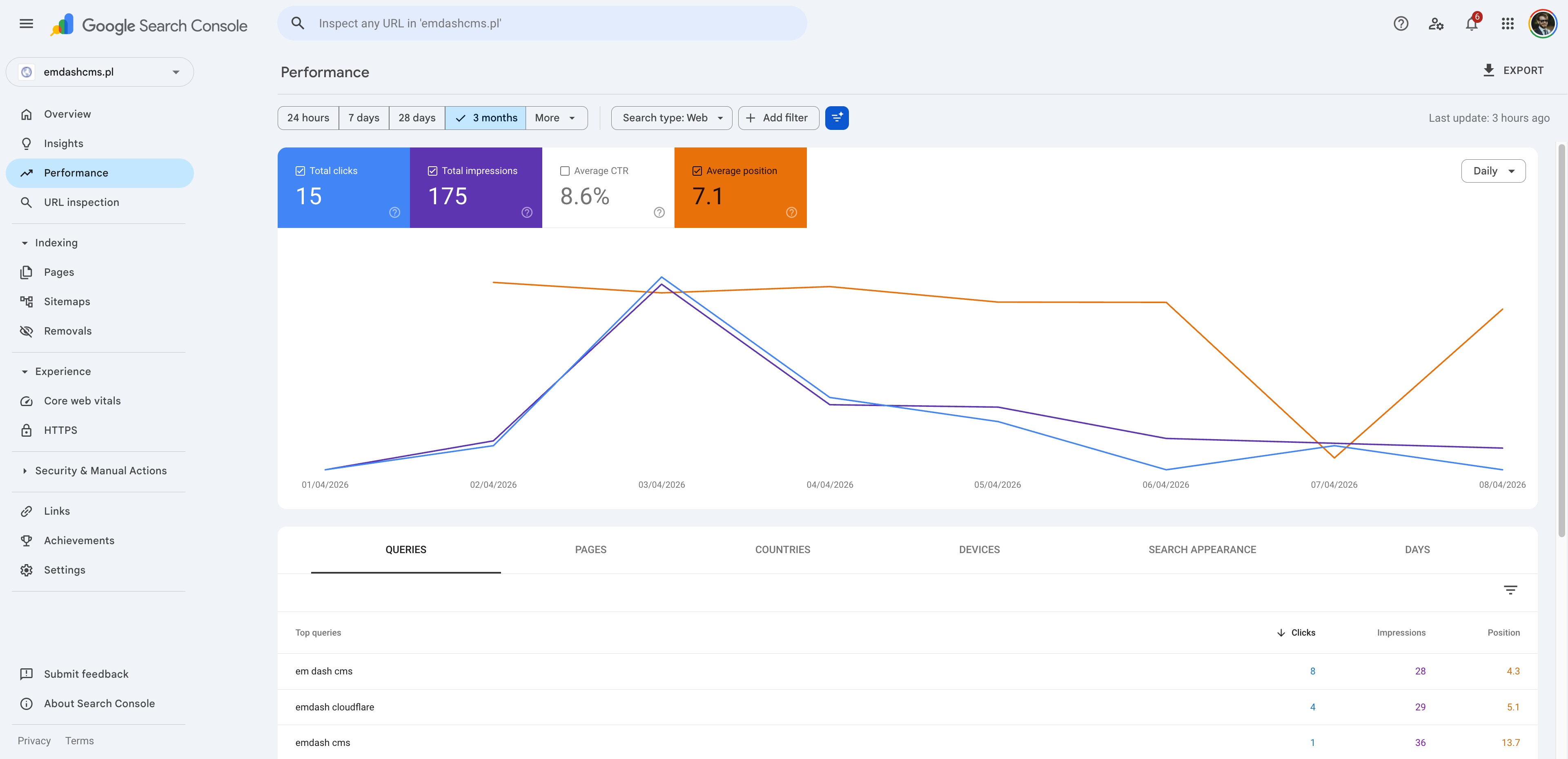
| Search Console (1 week since submission) | WordPress (emdash.pl) | EmDash (emdashcms.pl) | Winner |
|---|---|---|---|
| Total clicks | 65 | 15 | WP — 4.3× more |
| Total impressions | 195 | 175 | ~tied |
| CTR | 33.3% | 8.6% | WP — 3.9× higher |
| Average position | 3.5 | 7.1 | WP — half the rank |
Top brand query — emdash cms (clicks) | 48 | 1 | WP |
Top brand query — emdash cms (position) | 3.4 | 13.7 | WP |
Top brand query — em dash cms (position) | 2.3 | 4.3 | WP |
Read those last three rows again.
The WordPress site — the one I built in a day, never touched again, started a day late — outranks the EmDash showcase site on the EmDash brand query itself. Position 3.4 vs 13.7. Forty-eight clicks vs one. On a query where the EmDash site is, by name, the better topical match.
I want to be careful here. SEO is multi-causal. One week is very short — these numbers will move. Brand attribution is messy. The impression counts are within noise of each other, which suggests Google is showing both sites for similar queries. But two facts are hard to argue with even at this sample size:
- Average position differs by half a rank tier (3.5 vs 7.1) — and Google’s ranking signals are dominated by Core Web Vitals, page experience, and crawl health, all of which favor the WP site based on the lab data above.
- CTR differs by ~4× (33.3% vs 8.6%) on similar impression volume — which is what you’d expect when one site loads in 100 ms and the other has a 35% chance of a >800 ms cold start during business hours.
I cannot prove from one screenshot pair that performance caused the SEO gap. I can say that the site Jacek filed in the “scrap and rebuild” tier is losing to the site he filed as “normal, expected” on every Search Console metric that counts — and that the tier EmDash was supposed to be in, “exemplary” Astro-class, was a tier it never actually reached. That is not the direction the chart was supposed to go.
The numbers — server processing time
Server processing time is TTFB minus DNS, TCP and SSL. It’s pure backend work: database queries, HTML rendering. It isolates the part you can actually fix.
| Metric | EmDash (CF Workers + D1) | WordPress (Hetzner) | Delta | Winner |
|---|---|---|---|---|
| Mean | 543 ms | 84 ms | +459 ms | WP — 6.4× faster |
| Median | 543 ms | 69 ms | +474 ms | WP |
| Min | 129 ms | 42 ms | +87 ms | WP |
| Max | 2,196 ms | 246 ms | +1,950 ms | WP |
| P95 | 864 ms | 148 ms | +716 ms | WP |
| P99 | 1,121 ms | 234 ms | +887 ms | WP |
| Std Dev | 178 ms | 42 ms | ||
| CV | 32.8% | 49.7% | EmDash (more consistent) |
WordPress’s worst measurement (246 ms) is faster than EmDash’s best post-page measurement (~400 ms). That’s not a margin you optimize away. That’s a different category of latency.
The CV column is the only place EmDash technically wins. Cloudflare Workers are consistently slow rather than occasionally fast, which matters for capacity planning but does not help your user.
Total TTFB — what the user actually waits for
| Metric | EmDash | WordPress | Delta |
|---|---|---|---|
| Mean | 596 ms | 136 ms | +460 ms |
| Median | 593 ms | 116 ms | +477 ms |
| P95 | 939 ms | 233 ms | +706 ms |
| Max | 2,294 ms | 373 ms | +1,921 ms |
Network breakdown
| Phase | EmDash | WordPress |
|---|---|---|
| DNS | 3 ms | 3 ms |
| TCP | 1 ms | 1 ms |
| SSL | 49 ms | 47 ms |
| Server | 543 ms | 84 ms |
Network is identical. The 459 ms gap is entirely backend work. Every chart in this article is really one chart with different y-axes: it’s the cost of fetching a content page from D1 at the edge versus from a local MySQL on the same physical box as PHP.
Per-page comparison — WP wins 13 / 13
Per-page numbers are remarkably consistent. WordPress wins every single one of the 13 tested pages. The EmDash homepage (225 ms) is the only sub-300 ms result EmDash delivers — and it cheats, because the homepage runs a single post-list query. Every EmDash post page clusters at 550–590 ms, because it chains three or more sequential D1 round-trips (entry → tags + related → related tags) at ~50–100 ms each. WordPress covers all 13 pages in 78–91 ms. Full per-page table in the benchmark report.
This is not a code-quality issue. EmDash uses Promise.all() where it can. The dependency chain is what it is. The bottleneck is the architecture, not the implementation.
Cold starts are real and they follow the working day
Once I forced 3-hour gaps to make Workers actually go to sleep, cold starts became the dominant story.
| Mean | Median | P95 | Max | n | |
|---|---|---|---|---|---|
Cold (:00) | 649 ms | 548 ms | 1,121 ms | 2,196 ms | 260 |
Warm (:01/:02) | 549 ms | 519 ms | 703 ms | 939 ms | 520 |
The headline number (+18% on average) hides the more important fact: the >800 ms zone is cold-start exclusive. Out of 520 warm requests, exactly 2 crossed 800 ms. Out of 260 cold requests, 50 did. That’s a 48× higher chance of a slow page when the Worker had to spin up.
Cold starts also follow a daily cycle that maps almost exactly to the working day: mildest at 01:00–04:00 UTC (~550 ms average, 8–12% spike rate), worst at 10:00 UTC (745 ms average, 35% of requests crossing 800 ms, max 2.2 s). This correlates with global Cloudflare platform load, which I cannot control. Full hourly breakdown in the benchmark report.
WordPress, for the record, shows zero cold-start effect:
| Mean | Max | |
|---|---|---|
WP cold (:00) | 80 ms | 243 ms |
WP warm (:01/:02) | 84 ms | 239 ms |
Negative delta on cold. There is no cold start. PHP-FPM pools are warm because the box never sleeps.
I paid Cloudflare $5 to fix this. It got slightly worse.
Halfway through the experiment, I upgraded the EmDash account from the Free plan to the Workers Paid plan ($5/mo). Cloudflare’s docs don’t promise improved TTFB on the paid plan, but for $5 I wanted to be thorough.
The paid plan gives you more CPU time per request, more total requests per month, and Durable Objects. It does not, as far as I can tell, address D1 latency. The numbers confirm it:
- Mean server processing: +72 ms (+14%) on paid vs free — 522 ms → 594 ms
- % of requests over 800 ms: jumped from 5.0% to 8.5% on paid
- % of requests over 1,000 ms: jumped from 1.8% to 4.3% on paid
- WordPress control group moved by 1 ms in the same window — confirms the difference on the EmDash site is real, not test-server noise
After controlling for time of day (matching cold-start hours), paid is still ~52 ms slower on average. The result varies by hour and could be Worker pool placement noise, so I am not going to claim paid is categorically worse. But if you are upgrading because you read somewhere that paid Workers are faster: save your $5. The bottleneck is downstream of anything CPU limits will fix. Full Free-vs-Paid breakdown in the benchmark report.
What I tried to do about it
After the initial benchmark, I went into the EmDash code and did everything I could think of to reduce D1 round-trips. Two changes mattered.
1. server:defer on widget areas
Every post page rendered a sidebar (search, categories, tags, recent posts, archives) and a footer widget area before responding. Each widget made its own D1 query. The sidebar alone fired 7 queries on the critical path.
Astro’s server:defer directive moves a component out of the initial response — the page ships immediately with a placeholder, and the deferred component loads via a follow-up micro-request. The work still happens, but it doesn’t block TTFB.
This is not free. server:defer does not apply to components imported from node_modules, so it requires writing thin wrapper components inside the project just to gain access to the directive, plus skeleton fallbacks so the page does not pop when the deferred content arrives. None of it is documented as a thing you have to do. It is not part of the out-of-the-box EmDash experience. Full wrapper pattern + fallbacks are in the EmDash repo, on the perf/server-defer-widgets branch.
2. Killing an N+1 with an undocumented batch API
Every page that lists posts (homepage, archive, post detail with “read more”) was fetching tags per post in an N+1 loop — one D1 query per post. EmDash exposes getTermsForEntries, a batch API that fetches all tags in a single WHERE entry_id IN (...) query. It is undocumented. I found it by reading source. Applied across 5 listing pages (/, /posts, /posts/[slug], /category/[slug], /tag/[slug]). Full before/after diff in the EmDash repo on the perf/server-defer-widgets branch.
What it bought me
| Metric | Before | After | Delta |
|---|---|---|---|
| Server mean | 542 ms | 322 ms | −220 ms (−41%) |
| Server median | 547 ms | 317 ms | −230 ms (−42%) |
| TTFB mean | 593 ms | 373 ms | −220 ms (−37%) |
| P95 | 732 ms | 368 ms | −364 ms (−50%) |
| P99 | 1,094 ms | 424 ms | −670 ms (−61%) |
| Max spike | 2,196 ms | 745 ms | −1,451 ms (−66%) |
| CV (consistency) | 29.3% | 11.6% | 2.5× more stable |
41% off the mean, 61% off the P99, max spike cut by two-thirds. That’s a real win — and I’d take it on any project. It is not enough.
| Metric | EmDash (optimized) | WordPress | Ratio |
|---|---|---|---|
| Server mean | 322 ms | 78 ms | 4.1× (was 6.4×) |
| Server median | 317 ms | 53 ms | 6.0× |
| P95 | 368 ms | 142 ms | 2.6× |
| Max spike | 745 ms | 245 ms | 3.0× |
After every optimization I could think of, WordPress is still 4× faster. The remaining ~320 ms is the floor — roughly 8 sequential D1 round-trips at ~40 ms each. There is no code-level fix for that. It is the cost of asking a database that lives at the edge to answer a question that requires three follow-up questions.
And then I added edge caching
Once I’d exhausted the data-fetching optimizations, the only remaining lever was full-page caching. I added a Cache-Control: public, max-age=0, s-maxage=60, stale-while-revalidate=300 header via middleware — 60 s fresh at the edge, then 5 minutes of stale-while-revalidate.
There’s a trap here that ate an hour of my life: Workers on a custom domain bypass Cloudflare’s CDN cache layer by default. The standard Cache-Control header has no effect — responses go straight from Worker to client. To actually cache, the Worker entrypoint has to be wrapped in explicit caches.open() / match() / put() calls. Full middleware + wrapper implementation in the EmDash repo. Once that was in:
| Page | Uncached (optimized) | Cached HIT | Improvement |
|---|---|---|---|
| Homepage | 294 ms | ~150 ms | −49% |
| Post pages | ~325 ms | ~110 ms | −66% |
Cached EmDash post pages are now faster than uncached WordPress.
I want to be brutally clear about what this proves: nothing. WordPress without caching, vs EmDash with caching, is not a fair comparison. WordPress with WP Super Cache, or Cloudflare APO, or even a basic Varnish, would land in the same sub-100 ms territory. The point of the caching round was not to declare a winner. It was to confirm that edge caching is a workable mitigation for D1 latency, in case you want to ship EmDash to production with eyes open.
It is also exactly the lever that does not help you with the audience that started this whole article.
Why caching does not save you on Search Console
Here’s the part that sealed the verdict for me.
The two domains are still live as of this writing. Since the benchmark ended:
- The WordPress site received zero updates. Zero plugin changes, zero new posts, zero touches. Set-and-forget, the way most SMB sites actually live in the wild.
- The EmDash site received an updated cache strategy and three new articles. Active development.
- I stopped warming the EmDash Worker (no more cron pinging it every 10 minutes). It is now serving traffic the way a real low-traffic SMB site would.
What happened to crawl stats?
The cache strategy update had no measurable effect on crawl response time. And once the warming stopped, cold starts actually got worse. Googlebot is the perfect cold-start victim: it shows up irregularly, often hits URLs nothing else has visited recently, and gets exactly zero benefit from the Worker being warm for human users five minutes ago. Every Googlebot fetch is, statistically, a cold fetch.
Edge caching helps the human user who loads a page that someone else loaded 30 seconds earlier. It does very little for a crawler that walks your sitemap once a day and sees a different URL each time. That’s why Jacek’s blind read landed where it did.
This is also why “just turn on cache” is not the answer for the use case I was originally excited about. If your client’s site needs to rank, the bot’s experience matters. And the bot keeps walking into a cold Worker.
After Jacek read the full article
Jacek Żmudziński — Head of GEO & SEO at Makolab, who already gave the blind verdict on the crawl-stats charts above — read the full preview and wrote back. With his permission, I am reproducing his note here in full, because it puts the SEO/GEO angle on this whole experiment better than I did:
I very often come across WordPress websites that are slow, overloaded with plugins, and create serious Cost of Retrieval issues. This is a key topic in SEO today — search engines pay the real cost of crawling, rendering, and indexing content. In the context of GEO and building visibility in AI, this efficiency matters even more.
WordPress has earned a reputation for being ‘heavy,’ but this benchmark is a real eye-opener. Seeing a hand coded WP theme outperform a modern edge/serverless stack by 6.4x proves that the engine isn’t the problem. It’s the technical debt and poor implementation.
That’s the real WordPress paradox. Plugins are both its biggest advantage and its biggest risk. WordPress itself isn’t the issue; it’s how it’s maintained. A well-built WP site is still a performance benchmark that’s very hard to beat.
The phrase Cost of Retrieval in Jacek’s first paragraph is doing a lot of work and is worth pausing on. It is the unspoken bill on every page of every site you ship — every byte a crawler downloads, every millisecond it waits, every render it has to finish to extract something usable. Crawlers operate on a budget, and they are the ones who decide which pages on your site get re-fetched often enough to stay fresh in the index. A site that costs Googlebot 400 ms per fetch instead of 80 ms is not just “five times slower” in some abstract sense; it is a site that gets re-crawled less often, whose updates land in the index later, and whose answers stay stale longer in the AI summaries that quietly read from the same crawl. That is the real downstream cost the EmDash side of this benchmark is paying — and it is the part Jacek puts a name on that the rest of this article had only been gesturing at.
WordPress is absurdly fast — when you don’t bury it in plugins
I want to take one quick detour from beating up EmDash to do something I almost never see done in 2026: say something nice about WordPress.
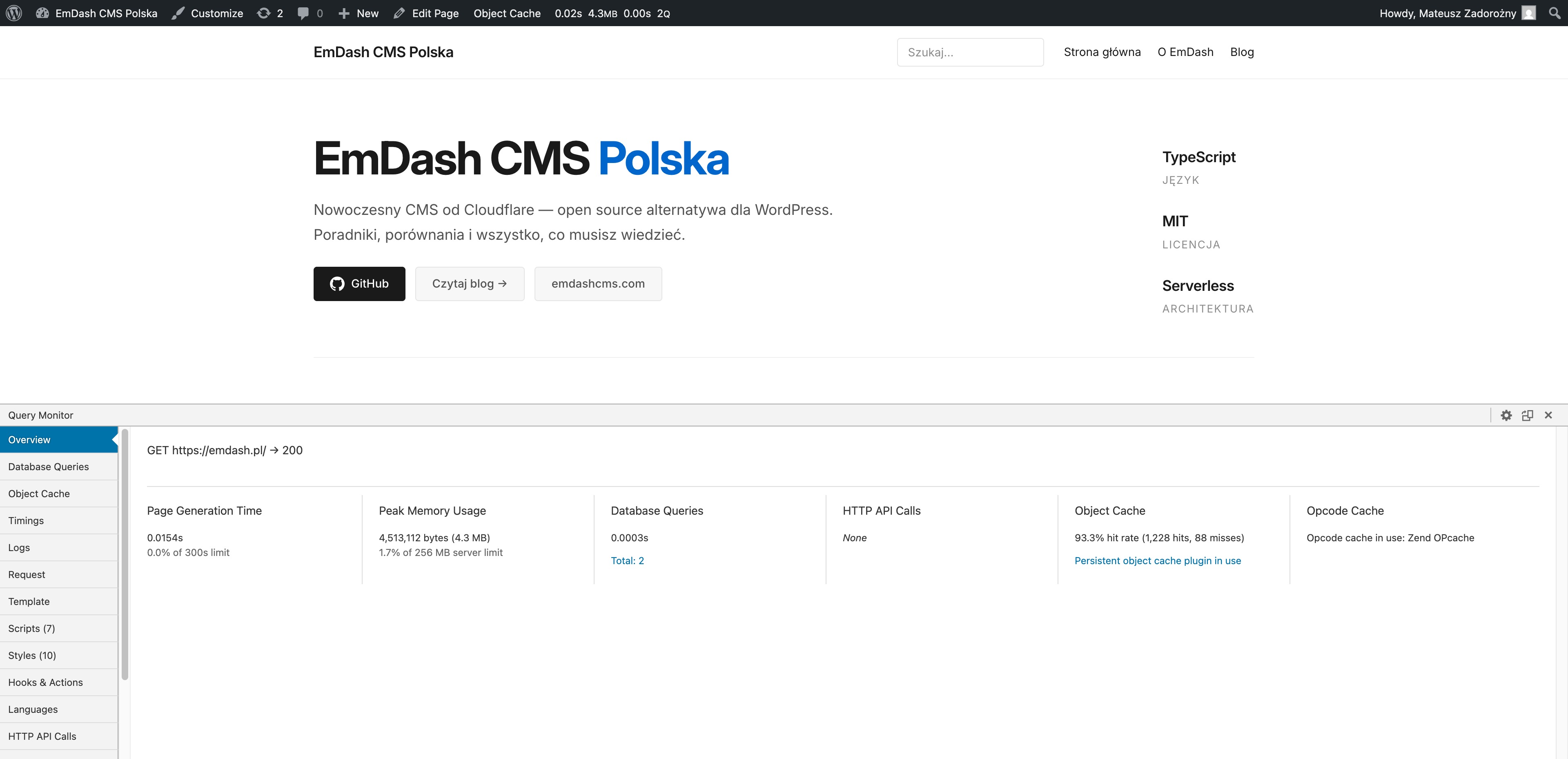
Here is what the inside of the WordPress comparison site actually looks like, measured by Query Monitor on production. Same hand-coded theme that produced the 84 ms server-processing mean in the benchmark above. No page builder. No plugin soup. Object Cache + Zend OPcache. That’s it.
Homepage (emdash.pl/):
Post page (emdash.pl/przyszlosc-cms-emdash/):
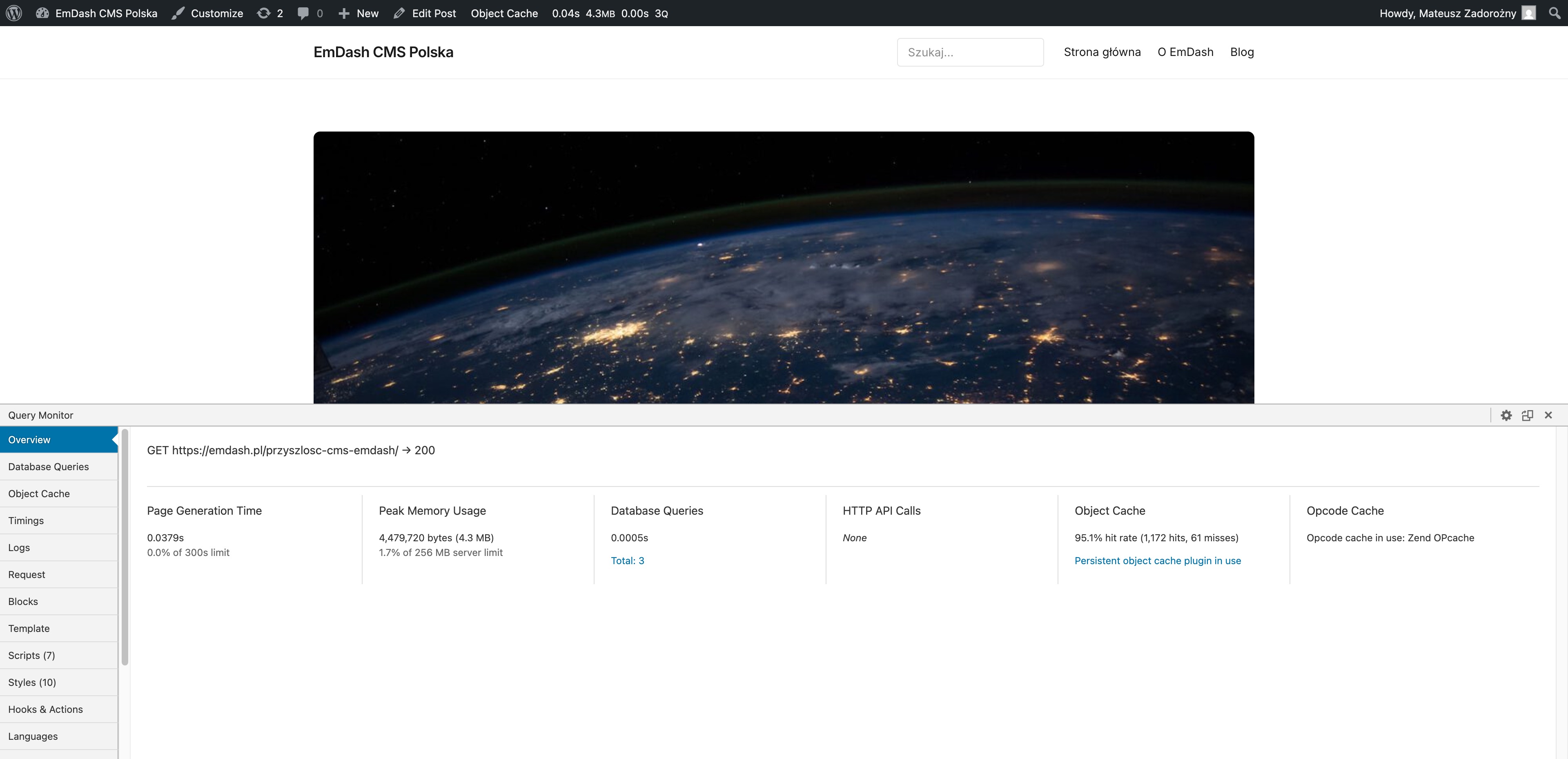
| Metric | Homepage | Post page |
|---|---|---|
| Page Generation Time | 15.4 ms | 37.9 ms |
| Database Queries | 2 | 3 |
| Total query time | 0.3 ms | 0.5 ms |
| Peak Memory | 4.3 MB (1.7% of 256 MB limit) | 4.3 MB (1.7% of 256 MB limit) |
| HTTP API Calls | None | None |
| Object Cache hit rate | 93.3% (1,228 hits, 88 misses) | 95.1% (1,172 hits, 61 misses) |
| Opcode Cache | Zend OPcache | Zend OPcache |
Read those numbers slowly.
PHP is generating the entire page in 15 milliseconds on the homepage and 38 milliseconds on a post page. The database is being asked 2 or 3 questions, and answering them in under half a millisecond combined. Object Cache is hitting 93–95% of the time, which is why MySQL is barely involved at all. Memory footprint is 4.3 MB on a 256 MB limit. There is no HTTP API call. There is no remote anything.
This is the unfashionable truth of WordPress in 2026: the engine itself is very fast. It is fast in the way a well-tuned C program is fast. PHP 8.4 with OPcache, a sane object cache, a hand-written theme, and a database with no plugin gunk in it — that stack will outrun a lot of “modern” alternatives, and the screenshots above are just the receipts.
The reason WordPress has a reputation for being slow is earned — but earned by the wrong WordPress. By Elementor. By Divi. By bad ThemeForest themes. By “we just installed a caching plugin.” By 47 active plugins each registering its own admin-ajax handler on every front-end page load. By a theme bloater plus three “SEO” plugins plus a contact form plugin plus a Stripe plugin plus a “we needed analytics” plugin. That WordPress will absolutely hand you a 2–3 second TTFB on a shared host. And then someone migrates that monstrosity to a serverless edge stack and reports “WordPress was slow, the new stack is fast.”
Yes — but you didn’t fix WordPress. You moved the bloat off WordPress.
If you take only one thing from this whole article, it should not be “EmDash is bad.” It should be: before you rewrite your stack to escape a slow WordPress site, ask whether you actually have a slow WordPress site, or whether you have a fast WordPress engine being smothered by 47 plugins you can simply uninstall. A hand-coded theme on the same hardware will frequently be the cheaper, faster, less risky migration than any rewrite — including this one.
The hand-coded WordPress here is the boring answer. It is not exciting. It is not on the front page of Hacker News. It is what actually runs almost every business website that has stayed up and ranked for a decade. The reason this benchmark exists at all is that I assumed something newer would do the job better. The data did not cooperate.
Where EmDash might actually win — and why my use case wasn’t it
I want to be careful here, because the wrong takeaway from this article is “EmDash is bad”. It isn’t. It’s wrong for the use case I evaluated it on — and that use case has a name: low-traffic content sites for small businesses, the kind where Googlebot is half your daily traffic and the marketing director updates the team page once a quarter.
If you flip the variables, the picture changes a lot.
Imagine a site with millions of pageviews a month. A news outlet, a high-volume e-commerce content hub, a global SaaS docs site. Everything I measured as a problem in this article inverts:
- The Worker is never cold. It serves a steady stream of requests around the clock. The 18% cold-start penalty becomes a rounding error, because almost nothing is ever cold.
- D1 reads are hot in local edge caches. The same handful of queries hit the same shards constantly, and the platform’s internal caching layers have actual data to work with.
- The edge cache hit rate is high. With enough traffic to keep popular pages warm,
s-maxage=60produces a near-100% hit rate instead of the near-zero rate Googlebot sees on a quiet site. - The operational story is genuinely good. No servers to patch, no PHP version to upgrade, no “your site is down because the host migrated to a new IP.” For a 50M-pageview operation, deleting an entire layer of infrastructure is worth real money — possibly more than the latency gap costs.
I haven’t measured this scenario. I would not be shocked if a high-traffic EmDash deployment looks competitive with — or even beats — a comparably-managed WordPress one, exactly because the cold-start problem disappears at scale and the “no infrastructure” pitch starts paying for itself in real ops budget. That’s a different article and someone else’s measurements.
But that wasn’t my use case. My pitch for EmDash was the opposite end of the traffic curve: small-business sites, hundreds to a few thousand visits per month, content updated occasionally by a non-technical owner. At that traffic level, every dynamic the high-traffic story relies on inverts:
- The Worker is cold most of the time, because traffic is sporadic and irregular.
- Googlebot is a disproportionately large slice of total hits — and Googlebot fetches are always, statistically, cold.
- The edge cache rarely warms up, because there isn’t enough repeat traffic to keep popular pages inside the
s-maxagewindow. - You’re fighting cold starts continuously, on exactly the pages that matter most for SEO.
For that segment — the segment EmDash was supposed to be the small-business answer to — the data in this article is unambiguous: it does not solve the problem I hoped it would solve, and it is measurably slower than the WordPress comparison site I built specifically as a control.
If you’re running a high-traffic content operation and you find yourself in a “no more servers, please” mood, go test EmDash for real — your numbers might tell a very different story than mine, and the operational savings might be the deciding variable rather than the latency gap. But if your job is giving a small-business client a fast, low-maintenance content site that has to rank, this experiment is not encouraging.
What this means for SHIFT64
I started this experiment hoping to add a third tool to the SHIFT64 stack. Right now, the strategy doc is honest about what we ship: Astro for static, WordPress for content-heavy, WooCommerce for commerce. EmDash was supposed to fold into that as “the editable Astro for SMBs”. After 4,732 measurements, I’m not ready to recommend it for that role yet.
Here’s the lens I’m now using. For each of the three use cases I care about:
| Use case | What I’d ship today | Why |
|---|---|---|
| Static / marketing site | Astro (the way shift64.com itself is built) | Sub-100 ms TTFB without thinking about it. Zero ops. |
| Content site that an owner edits | WordPress, hand-coded theme, proper hosting | Boring, fast, and the editing experience already exists. |
| WooCommerce | WooCommerce on dedicated, high-frequency hardware | This is what SHIFT64 actually does for a living. |
Where I’d revisit EmDash:
- Cloudflare ships D1 read replicas that cut per-query latency by 5–10×. This is the single change that would move EmDash from “4× slower than WP” into “competitive with WP”. It is not currently available.
- Astro’s
experimental.cacheprovider lands for the Cloudflare adapter, which would let EmDash do real tag-based purge-on-edit instead of the 60-seconds-maxagewindow. That removes the staleness trade-off without losing the cache benefit. - An EmDash release where
server:deferand batch APIs are the default, not the careful manual optimization I had to discover.
If two of those three land, this becomes a different article.
Caveats I want to head off
-
“You ran an old version.” Maybe. But I worked from the official starter and the documented APIs at the time of testing. If there is a better stack inside EmDash that I missed, it is not in the docs, not in the starter, not in the published examples, and not findable in the time a real consultant would spend evaluating a CMS. That itself is a finding.
-
“You should have used [X].” If “X” is a configuration that is publicly documented as the recommended setup, please point me to it on X or LinkedIn — happy to re-run.
-
“You should have tested a ‘realistic’ WordPress site — Elementor, Bricks, page builder, plugin soup.” No, and here’s exactly why. EmDash has no visual page builder. You write
.astrotemplate files by hand — that’s the only way to build with it. If I had compared a hand-coded EmDash site against an Elementor WordPress site, the comparison would have been unfairly stacked against WordPress, because page builders add hundreds of milliseconds of overhead that have nothing to do with PHP, MySQL, or how WordPress actually serves a page. So I built the WordPress comparison theme the same way I built the EmDash one: a custom theme, written by hand, no visual builder, no Elementor, no Bricks, no plugin soup pretending to be a CMS. Both sites are doing the identical job — rendering HTML from a hand-coded template against a database — using each platform’s native templating layer. The day someone ships a page-builder plugin for EmDash, I’ll happily re-run with both sides bloated equally. Until then, this is the apples-to-apples version. -
“WordPress wasn’t optimized either.” Correct. That was the point. Both backends were doing real work on every request. The numbers on optimized WP would be even better.
-
“You should have tested it on Node.js. There are no cold starts there.” This is the most interesting objection so far, and it came from Maciek Palmowski after he read the preview. He also pointed out that EmDash runs fast on localhost in dev mode, which is the same observation from a different angle: take the edge round-trip out, and the engine flies. And he is right — EmDash is not strictly Workers-bound. Cloudflare’s own EmDash launch post says explicitly: “serverless, but you can run it on your own hardware or any platform you choose” and “You can run EmDash anywhere, on any Node.js server.” On a long-running Node process with a local SQLite or Postgres, the cold-start problem disappears, the D1 round-trip latency disappears, and the engine almost certainly lands in WordPress-class TTFBs or better, given that V8 + JavaScript is a significantly leaner runtime than PHP-FPM. I have not measured this. Two reasons:
- I don’t currently have a clean Node-hosting setup to put it on for a proper apples-to-apples test against the same WordPress comparison site. That is fixable; I just haven’t fixed it. If anyone with a tidy Node host wants to re-run my benchmark scripts on their setup, the repos will be public — please go for it, and I will link your results in a follow-up.
- Running EmDash on Node removes the headline feature. That same Cloudflare launch post is titled “Introducing EmDash — the spiritual successor to WordPress that solves plugin security.” The “solves plugin security” claim depends on plugins executing inside their own “Dynamic Workers” sandboxes — the v8 isolate architecture and the workerd runtime. That sandboxing primitive is a Cloudflare Workers thing. On a vanilla Node deployment, you get the speed, but you lose the plugin isolation model that Cloudflare put in the post title. The trade you are making is “my CMS runs fast but my plugins can do whatever they want to my server” — which is, structurally, the WordPress problem you were trying to escape in the first place.
So: yes, I would expect a Node-hosted EmDash to be fast — possibly faster than my hand-coded WordPress comparison. And I think that benchmark is genuinely interesting and should be run by someone with the right hardware. But it would be measuring a different product than the one Cloudflare actually launched. The product Cloudflare launched is the one I tested: Workers + D1 + plugin isolation. That is the version of EmDash whose performance envelope this article is about.
-
“The geography helps WP.” Actually it doesn’t — the WP traffic crosses ~400 km to Frankfurt while EmDash runs at the edge in (presumably) Warsaw. WordPress still wins by 6.4×. The longer path is dominated by 84 ms of fast PHP work.
Conclusions
- WordPress is 6.4× faster than EmDash on raw server processing for a small content site, because the database access pattern matters more than the runtime fashion.
- Aggressive optimization closes the gap to ~4×, but requires non-trivial developer effort and undocumented APIs. WordPress hits its number with zero tuning.
- Cloudflare Workers cold starts are real, daily-cycled, and exclusive to the >800 ms zone. They matter most during business hours. They matter most for crawlers.
- The Cloudflare paid Workers plan does not improve TTFB. If anything, slightly worse in this test.
- Edge caching is a viable mitigation for human users, not for Googlebot. The crawl-stats verdict from a blind expert review confirms this.
- EmDash is not currently a drop-in upgrade for the SMB-WordPress segment I was hoping to address. The architecture is fundamentally promising; the current performance envelope is not where it needs to be for that audience.
I don’t need EmDash to win. I want it to be a solid, credible alternative — the kind of thing I can put in front of a small-business client without a list of caveats. I still think the idea — Astro ergonomics, real CMS, no PHP — is worth pursuing. I just can’t recommend it today on the basis of “it will be faster than WordPress”, because the data says it won’t be.
Repos and discussion
Both repositories are public so anyone can re-run the benchmark, push back on the methodology, or extend it:
- EmDash benchmark site — full Astro 6 + EmDash + Cloudflare Workers + D1 setup.
mainbranch is the bare officialemdash-blogstarter (the “before” baseline)perf/server-defer-widgetsbranch is the “faster” version — contains the three optimization commits described above (server:deferon widget areas, batchedgetTermsForEntries, edge caching via Cloudflare Cache API). Includes wrapper components, skeleton fallbacks, middleware, and the Worker entry point wrapped withcaches.open()./benchmark/folder containsbench.sh(cron-scheduled curl collector),analyze.py(percentile / distribution analysis), the fullreport-v2.md, and rawresults.csv— everything you need to reproduce the numbers in this article.- The
READMEalso documents the gotchas I ran into along the way:cacheHintemitted without a consumer,server:defernot working onnode_modulescomponents, Workers on custom domains bypassing CDN cache, and the architectural D1 latency floor.
- WordPress comparison theme (
emdash-flavor) — hand-coded theme used as the control site. No page builder, no plugins beyond Object Cache, PHP 8.4 on Hetzner. Includes the seed content XML and the setup scripts that reproduce the exact comparison site from thewp-cliup.
In the meantime, the right place to argue with me is X or LinkedIn. I’d genuinely like to be wrong about this — if you can show me the configuration that gets EmDash to WordPress-class numbers without manually rewriting half the data layer, I will publish the follow-up.
Discuss this article:
Both sites in this benchmark were scaffolded with Claude Code. The benchmark ran 182 randomized runs across 13 pages on each site over ~3.5 days — 4,732 measurements total — plus 30 follow-up runs after each optimization. Raw data, analysis scripts, and both site repos are linked above.